
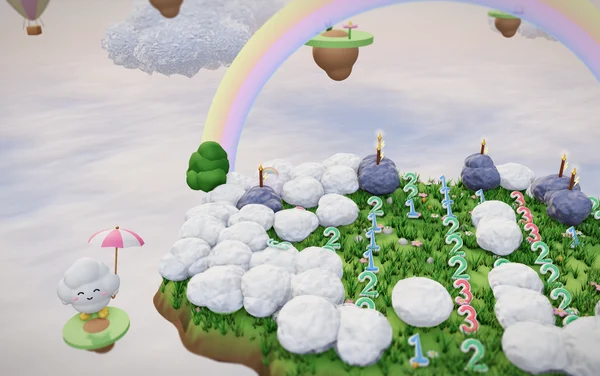







Read thunder clues and mark storms with lightning rods in a free 3D minesweeper puzzle, playable in desktop and mobile browsers.
Game Description
FLUFFSTORM: Cloud Sweeper is a free 3D minesweeper puzzle for desktop and mobile browsers where you uncover safe clouds by reading numbered thunder clues.
A cloud island shaped by the weather
Nimbo, a little cloud sprite, reacts to your moves beside a meadow island. Soft clouds part to reveal sun shafts, while a mistaken opening brings branching lightning and rain. The rounded scenery and warm kalimba music give this logic puzzle a cozy setting.
If you enjoy Microsoft Minesweeper, this 3D minesweeper variant adds hex boards, shaped islands and special weather to familiar number clues.
Modes
Adventure
Follow a level map that introduces new cloud rules as you move between themed islands.
Classic
Choose standard square-grid play without Adventure's special clouds.
| Difficulty | Board | Storms |
|---|---|---|
| Beginner | 9 × 9 | 10 |
| Intermediate | 16 × 16 | 40 |
| Expert | 30 × 16 | 99 |
| Custom | 5 to 30 columns, 5 to 24 rows | 8% to 30% in the setup controls |
Daily Sky
The daily minesweeper challenge uses a 14 × 14 bounding grid. The weekday determines its shape, square or hex layout, and featured special cloud.
Sky Trek (endless)
Clear successive boards as their size and storm density increase. Every third floor uses a hex grid. You start each run with three automatic umbrella protections, and unused protection carries into the next floor.
Game Objectives
Your goal in 3D minesweeper
Open every safe cloud to clear the sky. You can win with storms still unmarked; the victory sequence adds their lightning rods automatically.
Adventure goals
Complete 60 skies across 5 islands, with 12 skies per island. Each sky has three star conditions:
- Clear the sky.
- Finish at or below its par time.
- Consume no items and take no lightning strikes.
Earn all three in the same attempt for a three-star result. There are 180 stars in total. Par time is an extra target, so exceeding it does not end the level.
To unlock each later island, clear every sky on the previous island and reach the total shown here:
| Island | Total stars required |
|---|---|
| Puffy Peaks | 18 |
| Frost Drift | 40 |
| Gale Garden | 64 |
| Thunder Crown | 90 |
Other challenges
- Classic: improve your saved best time on each preset difficulty.
- Daily Sky: build a streak of first clears on consecutive local dates.
- Sky Trek: raise your highest completed floor.
Basic Rules
How to play 3D minesweeper
- Make your first opening. It is protected, although a cramped custom board may open only that cloud.
- Read the thunder clues. Each ordinary storm contributes one to every adjacent number. Square cells have up to 8 neighbors, including diagonals; hex cells have up to 6.
- Mark inferred storms with lightning rods. A rod records your judgment, and its gray rain-cloud appearance does not confirm that the cloud contains a storm.
- Use chording on ordinary-storm boards. When the adjacent rod count equals a number, clicking that number attempts to open its remaining neighbors. An incorrect rod can expose a storm. Frozen clouds are skipped, and thick clouds lose one layer.
- On giant-storm boards, check the weighted clues and open clouds individually. The chord check compares rod count with the clue value.
Opening a storm causes a lightning strike. A strike that is not stopped by protection or an available rescue ends the board. In Sky Trek, the run's automatic protection is used before an armed inventory Umbrella; reaching zero automatic protection still lets you continue playing.
Special clouds
| Cloud | Rule |
|---|---|
| Rainbow cloud | Always safe; gives sunbeams or an item when opened. |
| Thick cloud | Direct pokes thin it, then reveal its contents. It can cover a storm; area openings can thin or open it. |
| Frozen cloud | Ice melts after an adjacent safe opening; the cloud underneath may still contain a storm. |
| Wind cloud | Safe to open; clears safe clouds along its arrow, including thick clouds. A storm, still-frozen cloud or board edge stops the gust. |
| Giant storm | One storm cell contributes two thunder units to each adjacent number. |
Items (Adventure and Sky Trek)
| Item | Effect | Price in sunbeams |
|---|---|---|
| Telescope | Peek beneath the chosen cloud and its actual neighbors for 3 seconds. | 60 |
| Umbrella | Arm protection against one strike; consumed only when it catches lightning. | 120 |
| Barometer | Highlight a safe cloud or storm for 5 seconds. | 80 |
| Breeze | Open one hidden, unfrozen safe cloud, which can trigger an area opening. | 50 |
Controls
Desktop
- Left-click to open; right-click or F to place or remove a rod.
- Click an open number, or middle-click it, to request chording.
- Use the arrow keys or WASD to select a cell, then Space or Enter to open it.
- Drag to rotate and use the wheel to zoom. In free camera mode, Shift-drag or right-drag pans.
- Press C to switch cameras, 1 to 4 for items, and Esc to pause.
Mobile
In Blow mode, tap to open a cloud and long-press to place a rod. In Rod mode, tap to mark and long-press to open. Tap an open number to request chording.
Drag with one finger to rotate; use two fingers to zoom and pan.
Gameplay Tips
3D minesweeper tips for beginners
- Try Adventure 1-1 for the skippable, step-by-step tutorial.
- Start near the middle to give your opening more edges to work from.
- On ordinary-storm boards, look for a 1 with only one closed neighbor. That cloud must contain its storm.
- Work around the boundary of revealed ground. Corners and shaped-board edges often reduce the number of possible storm positions.
- Open rainbow and wind clouds early to collect rewards or reveal more clues.
- If a number is hard to see, adjust the camera before choosing another cloud. Stop to reason when the next safe move is unclear.
Advanced Strategy
3D minesweeper patterns
Use these straight-edge patterns on square boards with ordinary storms. The closed row must line up directly beside the clue row, with all other neighbors of those clues already open.
1-2-1
For three closed clouds beside a 1-2-1 clue row, the two end clouds contain storms and the middle cloud is safe.
1-2-2-1
For four closed clouds beside a 1-2-2-1 clue row, the two middle clouds contain storms and the two end clouds are safe.
Special cloud planning
Recount the actual neighbors on hex and shaped boards before applying a familiar square-board pattern.
Open safe neighbors beside ice before triggering a wind cloud aimed along that route. Removing the frozen obstruction lets the gust travel farther.
On Thunder Crown, a 2 beside just one closed cloud can indicate a single giant storm. Check thunder weight before treating a number as a count of separate hazards.
Items and the three stars
Use an assisted attempt to learn a level's shape and cloud rules, then retry for a fast clear without items or strikes. Place the Telescope over a dense clue boundary to see more useful information during its short reveal.
A Barometer hint can provide a safe target even when the visible clues do not prove it. Use it for assistance without assuming every hint demonstrates a deduction you could have made.
Sunny streaks
Plan a sequence of proven safe moves. Openings less than 2.6 seconds apart maintain a streak, which appears from three actions. Each group of 5 in your best streak earns 2 bonus sunbeams on a clear.
An area opening or chord counts as one action, however many clouds it reveals.
Sky Trek
Use information items at uncertain boundaries to preserve protection for later floors, where the larger boards and denser storms demand more checking.
Summary
Collections and achievements
Between puzzles, spend earned sunbeams on cloud skins, lightning-rod styles, hats for Nimbo and victory celebrations. There are also 25 achievements to work toward as you keep clearing skies.
Frequently Asked Questions
No, a guess-free board is not guaranteed. The solver tries to generate logically solvable boards within a limited budget. Classic has a no-guess option, and boards containing giant storms skip this generation filter.
Identical boards are not guaranteed. A shared date seed sets up the daily challenge, but your first opening and generation limits can change the final board. The daily reset follows your device's local date.
No, you can play without an account.
Progress saves in this browser on this device when local storage is available. It includes stars, sunbeams, items, records, collections and settings. Clearing the browser's site data removes it, and there is no account-based cloud sync.
No, an unfinished board is not saved for later. Finish the current sky before leaving if you want to record its result.
No, practice replays do not pay another completion bonus or extend the daily streak. Rainbow-cloud rewards can still be collected during practice.
English and Simplified Chinese are supported. Use the language option in Settings when both are included in the version you are playing.
No, cosmetics change the appearance of clouds, rods, Nimbo and celebrations. They do not change storm placement, thunder clues or the rules for winning.
No, FLUFFSTORM: Cloud Sweeper is an independent game and is not affiliated with Microsoft.