
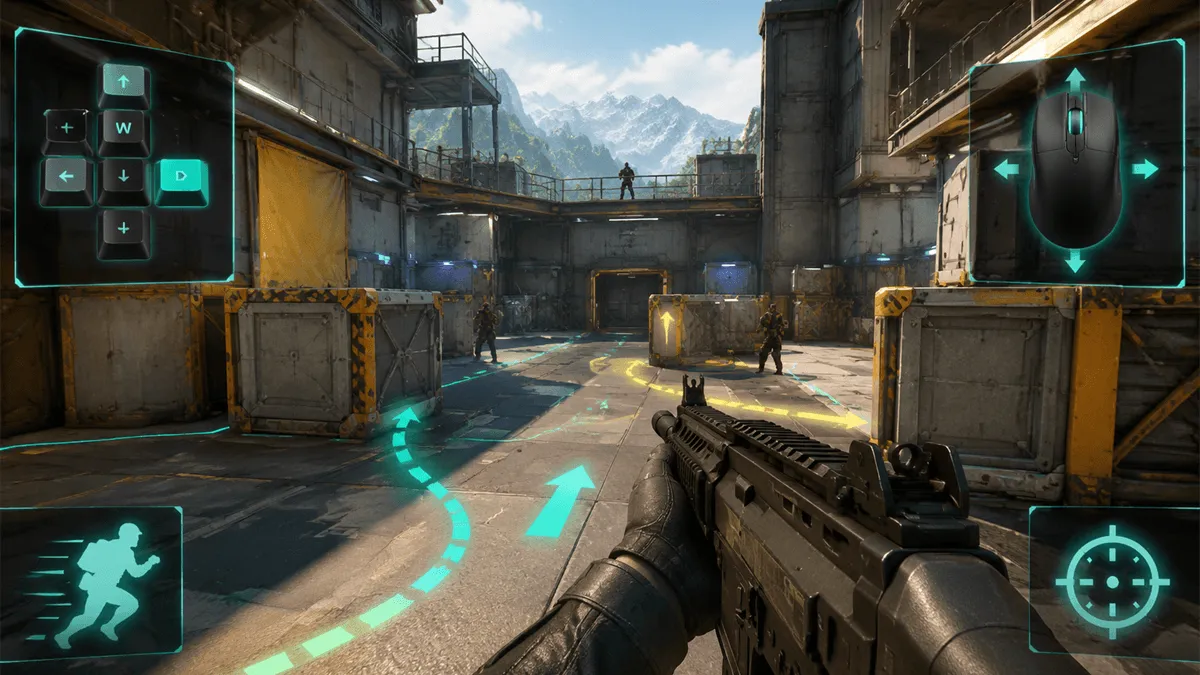
COMBAT ONLINE 2 Controls and Beginner Guide
COMBAT ONLINE 2 controls follow the familiar keyboard-and-mouse layout used by browser first-person shooters. Move with W, A, S, and D, use the mouse to look and aim, and click to fire. Shift is used for sprinting, Spacebar for jumping, the number keys switch weapons, and Tab opens match or scoreboard information. Start by learning movement and aim separately, then combine them in live matches.
COMBAT ONLINE 2 Controls
| Action | Control |
|---|---|
| Move | W, A, S, D |
| Look and aim | Mouse |
| Fire | Left mouse button |
| Sprint | Shift |
| Jump | Spacebar |
| Switch weapons | Number keys |
| Match or scoreboard information | Tab |
These controls are most useful when treated as a single movement system. Keep your crosshair near the height where an opponent is likely to appear, move into cover before reloading or switching weapons, and avoid standing still in open lanes.
How to Move and Aim More Consistently
Use short directional changes instead of holding one key for too long. Moving predictably makes it easier for another player to track you. When entering a doorway or turning a corner, aim toward the likely contact point before your full character moves into view.
Mouse sensitivity should let you turn quickly without making small corrections difficult. If your aim repeatedly passes the target, reduce sensitivity. If you cannot turn fast enough when attacked from the side, increase it gradually. Change one setting at a time so you can tell whether it improves control.
Weapon Switching and Range
Weapon choice depends on distance and available cover. A close-range weapon is easier to use in tight corridors, while a longer-range weapon rewards careful crosshair placement across open areas. Switch before entering the next engagement rather than waiting until an opponent is already firing.
The strongest beginner habit is to reload, switch weapons, and check the scoreboard while protected. Every interface action reduces the attention available for aiming, so complete it behind a wall or after leaving an exposed lane.
Beginner Match Checklist
- Confirm movement, jump, sprint, fire, and weapon-switch controls before chasing opponents.
- Keep the crosshair aimed toward doorways and corners instead of at the floor.
- Move between pieces of cover and avoid crossing open ground in a straight line.
- Use controlled shots when distance makes continuous fire inaccurate.
- Check the match objective and scoreboard without stopping in an exposed position.
Play COMBAT ONLINE 2 online to practice the controls in the browser.
Frequently Asked Questions
How do you play COMBAT ONLINE 2?
Enter a match, move with WASD, aim with the mouse, and click to fire. Use Shift to sprint, Spacebar to jump, number keys to change weapons, and cover to reduce the time you spend exposed to enemy fire.
What are the most important COMBAT ONLINE 2 controls?
Movement, aiming, firing, and weapon switching matter first. Learn WASD and mouse aim before adding sprinting and jumping, because accurate positioning usually creates better shots than pressing every control at once.
How can beginners improve their aim?
Keep the crosshair near likely opponent positions, avoid changing sensitivity after every match, and make small corrections while moving between cover. Consistency develops faster when the same mouse settings are used for several sessions.
August 20,2026